


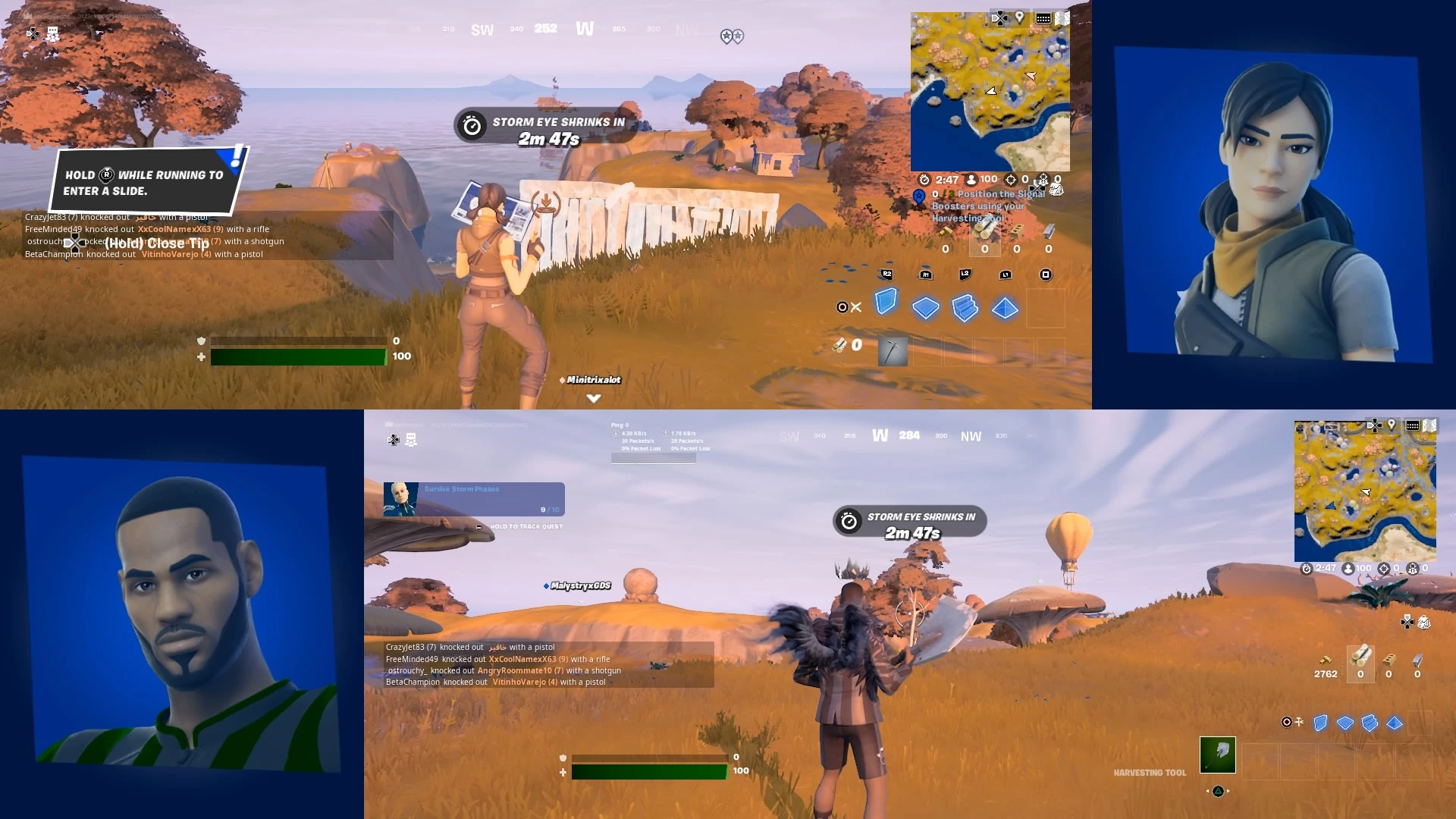
Fortnite Split Screen: 5 Easy Steps
5 Easy Steps For Fortnite Split-Screen
Fortnite is filled with action-packed battles that can keep players consumed for hours but sometimes having a warrior by your side takes the gameplay to a whole new level.
If you’ve found yourself wanting to team up with a worthy soldier, you’re probably wondering if split-screen is an option for Fortnite players. You’re in luck! Split-screen mode in Fortnite exists for select systems and game modes.
If you’re having trouble getting split-screen mode up and running, this article will be your guiding light to bringing a commade into battle with you. This will help make sure that you never have to go into battle alone ever again!
How To Use Split-Screen Mode in Fortnite
1. Preparation
Before heading out to battle with your loyal companion, you’ll need to make sure you’re doing so on a compatible console. Split-screen mode for Fortnite is only available for PS4, PS5, Xbox One, and Xbox Series X/S. If you’re hoping to bring a soldier along with you on PC, Nintendo Switch or Mobile, you’ll have to head to battle by yourself.
Make sure you have the latest version of Fortnite. We all hate waiting for games and apps to update but it’s the best way to ensure you have a glitch free split-screen experience.
2. Setting up the Console
Before firing up the game, make sure you have two controllers connected to the console. You’ll have to make sure that both players have their own Epic Games accounts and are signed in. If your battle companion is lacking an account, be sure to make one before attempting a split-screen game.
If you need to set up a new account, you can head over to Epic Games to register.
3. Start Fortnite
Now it’s time to fire up the game. Head to the main screen where you can see the different game modes and options. This is where you’ll have the second player sign in to enable split-screen options.
4. Enabling Split-Screen Mode
Even if the second player has signed in previously, you might be promoted to sign in player 2 by pressing a corresponding button on the second controller. This is indicated on the screen and will change based on the console you’re playing on. For Playstation, you’ll press ‘X’ to join, and ‘A’ on Xbox.
Once both players are properly signed in, you’ll be able to choose a profile and link it to player 2’s controller. From there, join the game and make sure both players appear in the lobby.
5. Choosing Game Mode
Once everyone is signed in and ready for action, you’ll have to pick a game mode that supports split-screen. Once you’ve picked the one right for you, both players will select ‘Ready’ from the menu options to start the matchmaking process.
Game Modes with Split-Screen Support
- Duos
- Squads
- Creative Mode (Limited Support)
Game Modes Without Split-Screen Support
- Solos
- Team Rumble
- Limited-Time Modes (LTMs)
- Save The World
Troubleshooting Fortnite Split-Screen Issues
- Check Controller Connections: Make sure both controllers are connected and that both accounts are signed in.
- Restart Game: Sometimes restarting Fortnite or the console can resolve any lingering issues.
- Outdated Game Version: Make sure you’re playing on the latest version of the game to remove any connectivity or gameplay issues.
- Unsupported Game Modes: Make sure you’re attempting to play in a supported gameplay mode like Duos or Squads.
- Console Performance Limitations: Make sure your console is well-ventilated and not overheating. Restart your console if necessary.
Split-Screen for the Team
Bringing a friend to battle will only enhance the gaming experience and give you a new challenge of working together to dominate the enemy. Split-screen mode in Fortnite can bring awesome gaming moments when you use proper communication and work together to defeat your enemies.
Enhance your gameplay with Steelseries GG. With GG’s suite of game-enhancing softwares, you can seamlessly capture key moments, enhance audio, and much more. Try it today for free!
Also check this out:
Wordsmith at SteelSeries. Enthusiastic about Dota 2 and fighting games. A cat dad.