


Best PC Keybinds for Black Ops 6 Multiplayer
PC players need the best keybinds to succeed in BO6.
If you’re attempting to use a keyboard and mouse in Black Ops 6, make sure you use the most optimal keybinds.
While a controller is still the most popular input device for Call of Duty, the keyboard and mouse scene on PC has certainly picked up steam over the past several years. More players than ever have ditched the controller to swap inputs for more precise aiming and freedom over their controls. If you’re someone who plans to use a keyboard and mouse in Black Ops 6 multiplayer, it’s imperative you set your keybinds correctly to gain any advantage possible over controller players.
Keybinds in Call of Duty haven’t changed much over the years, but Black Ops 6 offers some new mechanics that could change up what keybinds players use. Most of these mechanics stem from the omnimovement system, which completely alters how movement works in Call of Duty. With these mechanics in place, choosing your PC keybinds is more important than ever.
Best Black Ops 6 PC Keybinds
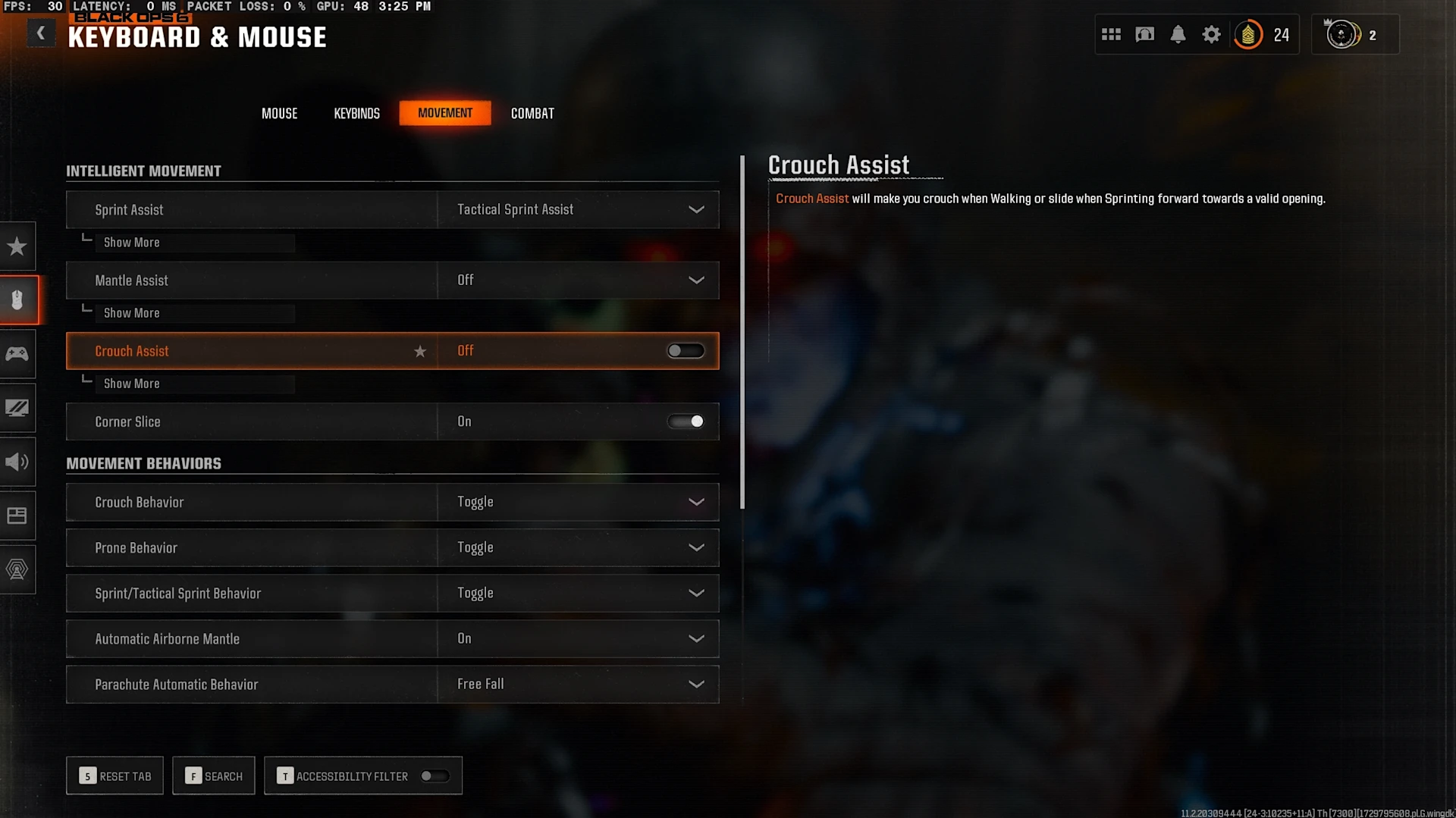
To access your keybinds menu in Black Ops 6, simply go to the main lobby screen in multiplayer. Then, select the six dots icon in the top-right corner of the screen, next to your player emblem and friends list. Here, choose “Settings” and then navigate to the “Controls” tab in the “Mouse” menu. You’ll be able to view all of your current keybinds but you can alter any one by pressing the button of the keybind you want to change. From there, press the new keybind you want to bind and it will change.
For our recommended keybinds you should use in Black Ops 6 multiplayer, take a look at the list below:
Movement Keybinds
Move Forward: W
Move Backward: S
Move Left: A
Move Right: D
Auto Move Forward: Caps Lock
Jump/Stand/Mantle: Space Bar
Prone/Dive: Z
Change Stance/Slide/Dive: (leave empty)
Crouch/Slide: C
Sprint/Tactical Sprint/Focus: Left Shift
Interact: E
Combat Keybinds
Fire Weapon: Left Mouse Button
Aim Down Sight: Right Mouse Button
Reload: R
Next Weapon
Primary: 2
Secondary: Mouse Wheel Down
Weapon Mount: ADS + Melee
Weapon Inspect: T
Fire Mode: B
Melee: F
Lethal Equipment: G
Tactical Equipment: X
Field Upgrade: Q
Overlay Keybinds
Scoreboard: Tab
Enable Cursor: Right Mouse Button
Map: M
Ping: Middle Mouse Button or Mouse Button 4 (if supported)
Text Chat: Enter
Emotes Menu: Y
Menu Keybinds
Launcher Menu: F1
Social Menu: F2
Settings Menu: F3
Loadout Menu: F6
Push to Talk: V
That wraps up all of the crucial keybinds you’ll want to have set for Black Ops 6. Some of them are what you might be used to if you’re a longtime keyboard and mouse player, but others could be a change-up from the norm. It’s recommended to simply try out the keybinds we’ve outlined and if you want to make any changes for personal preferences or muscle memory, you can do so. These are great keybinds to start with if you’re new to keyboard and mouse, so they’ll lay a solid foundation for you to potentially make changes in the future based on your gameplay style.
Now make sure to check out our previous guide on the best overall loadouts in Black Ops 6.
Get the new Call of Duty Limited Edition Collection!
Best Mouse Sensitivity and Movement Settings in Black Ops 6
While keybinds are what most players will change when they load up Black Ops 6, it’s important not to forget about your individual mouse settings. This includes changing your different sensitivities and ensuring all of your movement settings are correct.
Below, you’ll find optimal sensitivities for your mouse as well as all of the pertinent movement settings you need to change, which we went over in more depth in our dedicated omnimovement guide.
Mouse Sensitivity
Mouse Sensitivity: 6-8
ADS Sensitivity Multiplier: 1.00
ADS Sensitivity Multiplier (Focus): 1.00
Look Inversion (On Foot): Standard
Custom Sensitivity Per Zoom: Off
ADS Sensitivity Transition Timing: Gradual
ADS Sensitivity Type: Relative
Look Inversion (Ground Vehicles): Standard
Look Inversion (Air Vehicles): Standard
Mouse Acceleration: 0
Mouse Filtering: 0
Mouse Smoothing: Off
Mouse Wheel Delay: 80
Movement Settings
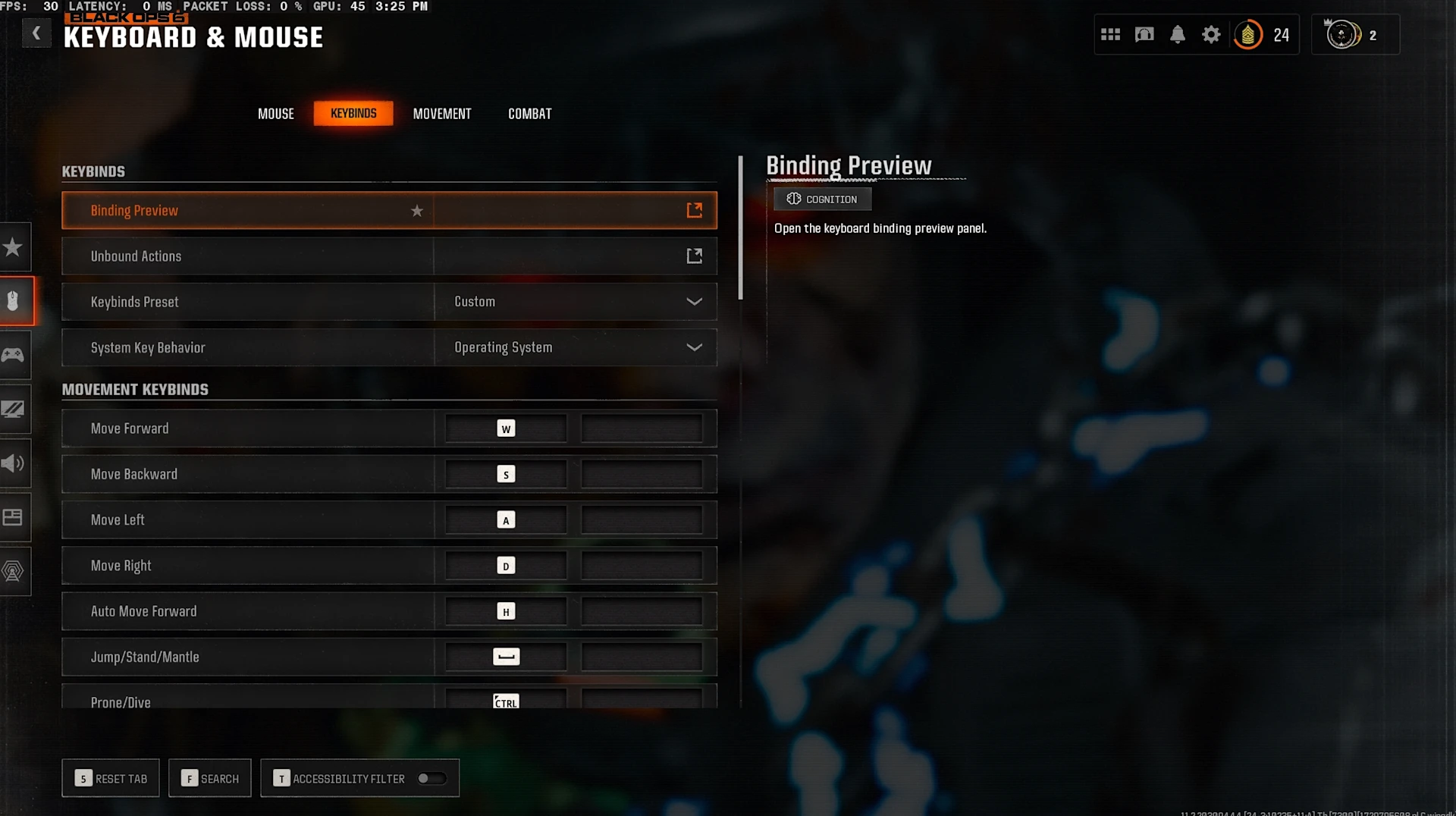
Sprint Assist: Tactical Sprint Assist
Sprint Assist Delay: 1
Sprint Assist Sideways: On
Sprint Assist Backward: On
Mantle Assist: Off
Crouch Assist: Off
Crouch Behavior: Toggle
Prone Behavior: Toggle
Sprint/Tactical Sprint Behavior: Toggle
Automatic Airborne Mantle: Patial
Auto Door Peek: Off
Walk Behavior: Hold
Walk Speed: Fast
Slide/Dive Behavior: Hybrid
Sprint Restore: On
Slide Maintains Sprint: On
Tactical Sprint Behavior: Single Tap Run
Plunging Underwater: Free
Sprinting Door Bash: On
The most important settings in this section are your mouse sensitivity and the Sprint Assist/Slide and Dive Behavior mechanics. Your mouse sensitivity is something that’ll be personal to you based on your preferences, mouse choice, and aiming skill. You should go into the firing range in the Black Ops 6 Gunsmith to mess around with different sensitives to find one that works for you, but anywhere from 6-8 is a good starting point.
Next, the Sprint Assist settings are crucial to having the best movement possible in multiplayer. Changing Sprint Assist to Tactical Sprint and lowering the delay will ensure you can move as efficiently as possible. Also helping with that is your Slide/Dive Behavior setting. While you have a few choices, most players have decided to learn the Hybrid setting. This makes it so you can slide and dive with the same button, allowing you to take full advantage of the omnimovement system.
As mentioned before, test out all of the settings we’ve recommended to see what you like and what you don’t like. Many of the movement settings are what professional players and the community are using, but that doesn’t mean they’re right for you.
After you’re done changing all of your PC keybinds and settings, . You can also take a look at our complete audio guide for Black Ops 6 so you’ll never have to worry about not hearing footsteps again.
Also check this out:
Joey Carr is a seasoned esports and gaming journalist with over 7 years of experience. He has covered major events like DreamHack Atlanta, Call of Duty Championships 2017, and Super Bowl 53.